
Start here
Five steps from an idea to something you can open. The rest of this page is about doing the first one well.
Say what you want
In Discord, run
/buildand fill intask: a menu opens where you check the request, the model and the budget, and nothing is built until you press Start build. On the website, open Build and type it. One or two sentences is enough to start; this guide is about making those sentences count.Pick a budget
The budget is the most the build may spend, not what it will spend. Credits it does not use come back when it finishes.
Ask for ideas first, if the idea is open
Set
ideasto true in Discord (or switch Ideas first on in its menu), or press Show me ideas first on the website, and you get three different concepts to choose from before anything is built. Asking is free.Watch it work
You see each step and the credits used so far. It may stop to ask you a question, up to three times. If you do not answer within three minutes it goes with its own pick.
Open it, then change it
Every build starts private. Open it, try it on your phone, and use Change something until it is right. Publish it when you want others to see it.
Or set your own budget, from 50 to 20,000 credits.
Writing the request
You do not need to know how websites are made. You need to say what you want clearly enough that there is nothing important left to guess. A good request covers five things.
What it is, and who it is for
A landing page for a dog groomer. A quiz for a Year 6 class. A leaderboard for our Discord server. The audience changes the words, the tone and the layout.
What a person does in it
Walk through it from opening the page to the end. "Pick a difficulty, answer ten questions against a timer, see a score, try again." This is the part most requests leave out, and it decides whether you get a working thing or a picture of one.
What must be in it
The pages, the features, the sections you would notice were missing. List them. Anything you do not list is left to its judgement.
The look
A mood and two or three colours do more than "modern and clean". You can attach up to ten pictures when you have a layout or palette in mind.
The real facts
Names, prices, opening hours, your own text. Give them and they are used word for word. Leave them out and it searches the web for public facts, or writes plausible ones you will have to replace.
The same idea, asked two ways
Landing page
make a website for my bakery
A one-page site for Crumb & Co, a family bakery in Leeds. People should see today's bakes, the opening hours (Tue to Sun, 7am to 3pm) and how to pre-order by phone on 0113 496 0000. Warm and handmade, cream and deep brown with one orange accent. One clear button: "Pre-order for tomorrow".
Why it works. It names the business, the one action, the real facts and the look. Nothing has to be guessed.
Game
make a fun space game
A space shooter that fills the screen. I fly a ship left and right along the bottom and shoot upward. Waves of enemies come down in patterns, every fifth wave is a boss, and power-ups drop: double shot, shield, speed. Three lives, score, best score saved. Keyboard on desktop, touch buttons on phones. Use ready-made space sprites and real sound effects.
Why it works. It says what the player does, what changes over time, and how it ends. "Fun" comes from those, not from the word.
Tool
a budget calculator
A monthly budget planner for students. I enter my income, then add expenses in categories (rent, food, travel, fun). It shows what is left, a doughnut chart of where the money goes, and warns me in plain words when a category is over 30% of income. My entries are still there when I come back.
Why it works. It names the inputs, the outputs and the one clever thing it should do, and asks for the data to be remembered.
What to leave out
How to build it. You do not need to name tools, files or techniques; it chooses those, and choosing them for it usually makes the result worse. Spend your words on what it is, what people do in it and how it should look.
Quick tips
Habits that make the biggest difference for the least effort.
One build, one idea
A site that is a shop, a blog and a game is three thin things. Build the main one, then add to it with changes.
Name the one action
Sign up, play, calculate, book. A page built around one action is clearer than one that offers five.
Give it your real words
Paste your text, prices and names into the request (up to 6,000 characters). Real content is the cheapest way to make a page look finished.
Show, do not describe
Attach a screenshot or sketch, up to ten pictures per request. "Like this, but for a florist" beats a paragraph about spacing. Pictures need a model that can read them; the form tells you when the one you picked cannot.
Say it out loud
In Discord you can attach a voice message to
/buildinstead of typing. Talking for thirty seconds usually gives more detail than typing two lines.Let it improve your request
On the website, Improve my request has the model you picked ask up to three questions about what your request leaves out, then rewrites it for you to accept, edit or ignore. Each question has answers to pick from, "Do as you wish", or your own words. It costs one chat message per step at that model's price and never starts a build.
Ask for ideas when you are unsure
With
ideason you choose between three concepts before spending anything on the build.Match the budget to the size
A single page rarely needs more than Small. Games, several pages, 3D and storybooks need room: a build that runs short stops adding and tidies up.
Change one thing at a time
Each change is its own small job with its own budget. Three clear changes land better than one message with nine.
Say where
"On the pricing page, in the header, the second card." Pointing at the place saves it from hunting and from changing the wrong thing.
Describe the problem, not the fix
"The jump feels floaty and I keep overshooting platforms" is better than "set gravity to 0.6". It can see the code; you can see how it feels.
Choose how it is made
After you press start, the builder says what kind of thing it thinks you asked for and offers a few choices: how the art of a game is made, which engine, what kind of sound; for a site, the three looks that suit your request best. Where we have measured a choice it shows dots for cost, result and time, and fewer dots is better. Leave everything on "Let it decide" if you have no preference. Where pictures are generated you can also pick the picture model, or have the AI choose one for your request and say why. Without a pick, Seedream 4.5 makes every picture, because it is cheap and reliable.
Decide how much it checks with you
The same step asks how much the builder should talk to you. By default it asks a few questions before it starts when your request leaves something open. "Just build it" asks nothing. "Check with me along the way" also shows you its plan first and checks in once a first version works. You can always answer in your own words instead of picking an option, and waiting for you costs nothing.
Look for the yellow note after a build
If your app calls an outside service or uses AI while people use it, it needs a step from you: a key for the service, or a daily AI allowance and the model that answers. The build page says so in a yellow note with a button that takes you there.
Ask for free assets by name
Say "use icons", "add real sound effects" or "use 3D models" and they come from the free asset library, which costs no credits. Ready-made game sprites are used only when you ask for them: in our tests, art the builder drew or generated for the game looked better than a stock pack.
Try it on your phone before sharing
Every build is checked at phone width, but only you can tell whether the buttons are where your thumbs expect them.
Recipes by type
Pick the kind of thing you are making. Each recipe says what to put in the request, what it will add without being asked, what to watch for, and gives a request you can copy and change.
Landing page
One page that presents one thing and asks for one action.
Put in the request
- Who or what it is for, in one line
- The one action you want (book, buy, join, download)
- Your real copy: the offer, prices, opening hours, a quote from a customer
- Two or three colours and a mood
It adds on its own
- A hero with a picture: a generated one, or a public-domain photo for real places and things
- Icons from one matching set for features and steps
- Sections in a sensible order: what it is, proof, how it works, details, closing call to action
- Gentle reveal-on-scroll motion that respects reduced-motion settings
A request to copy
A landing page for Ember & Oak, a small coffee roastery that sells monthly subscriptions. Show the three roasts (light, medium, dark) with tasting notes, how the subscription works in three steps, and one button: "Start my subscription". Warm, editorial, dark green and cream. Use icons for the steps.
Watch for
- A form on a build cannot send email or sign anyone up to an outside service. It can show a confirmation; to collect real sign-ups, add a connection to your own service.
- Leave out the facts and you get invented ones. Read every number before you publish.
Multi-page site
A home page plus the pages people expect: about, pricing, menu, contact.
Put in the request
- The list of pages, by name
- What each page is for, in a line each
- What stays the same on every page (logo text, menu, footer)
- The content you already have
It adds on its own
- One shared header, footer and style across all pages
- A menu that works on phones
- Real links between the pages, checked before it finishes
A request to copy
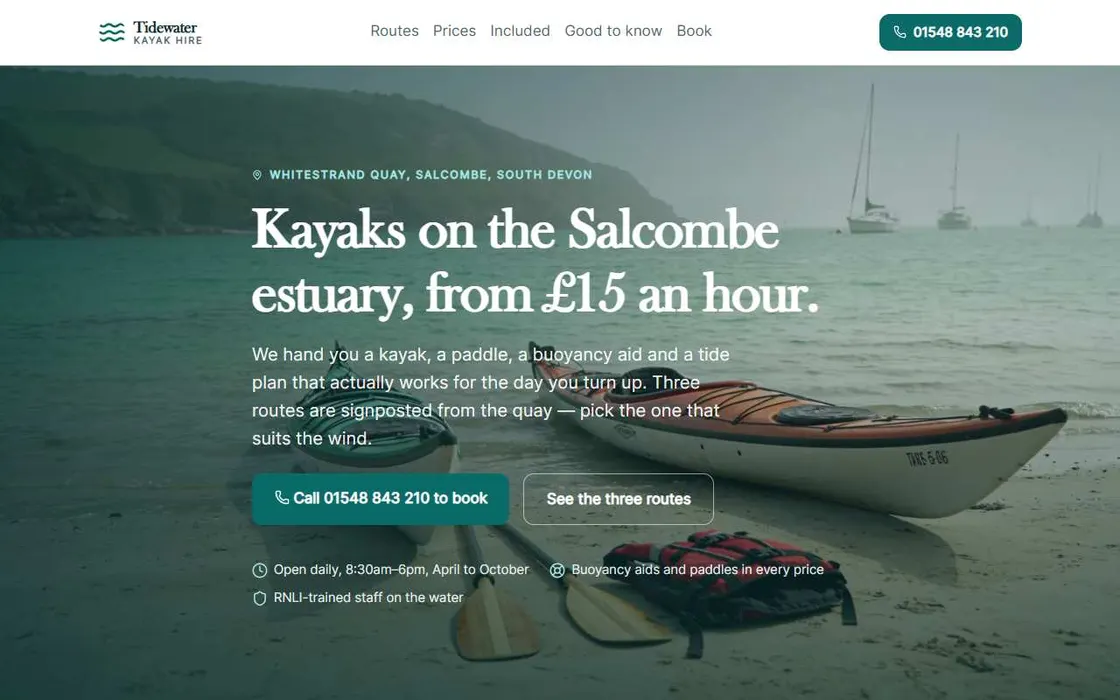
A four-page site for Tidewater Kayak Hire: Home, Routes (three routes with distance and difficulty), Prices (hourly, half day, full day), and Find us (address, a simple drawn map, opening times). Fresh and outdoorsy, teal and sand.
Watch for
- Every page costs budget. Five pages on Small leaves each of them thin.
- Ask for pages you can fill. A blog with no posts is an empty page.
2D game
Arcade, platformer, puzzle, card and action games that fill the screen.
Put in the request
- What the player does, second by second
- What gets harder or changes as it goes
- How it is won, how it is lost, what is scored
- The kind of game by name (platformer, shooter, match-three)
- How it should look: pixel art, flat and bright, hand-painted, neon
It adds on its own
- Art made for your game: small moving things drawn in code in one style, large things such as characters and backgrounds as generated pictures
- Real sound effects, with a mute button
- Your choice of how it is made, offered before the build starts: drawn art, generated pictures or a ready-made sprite pack; plain canvas or the Phaser engine
- Keyboard and touch controls, a start screen that explains them, pause, game over and restart
- Your best score saved between visits
A request to copy
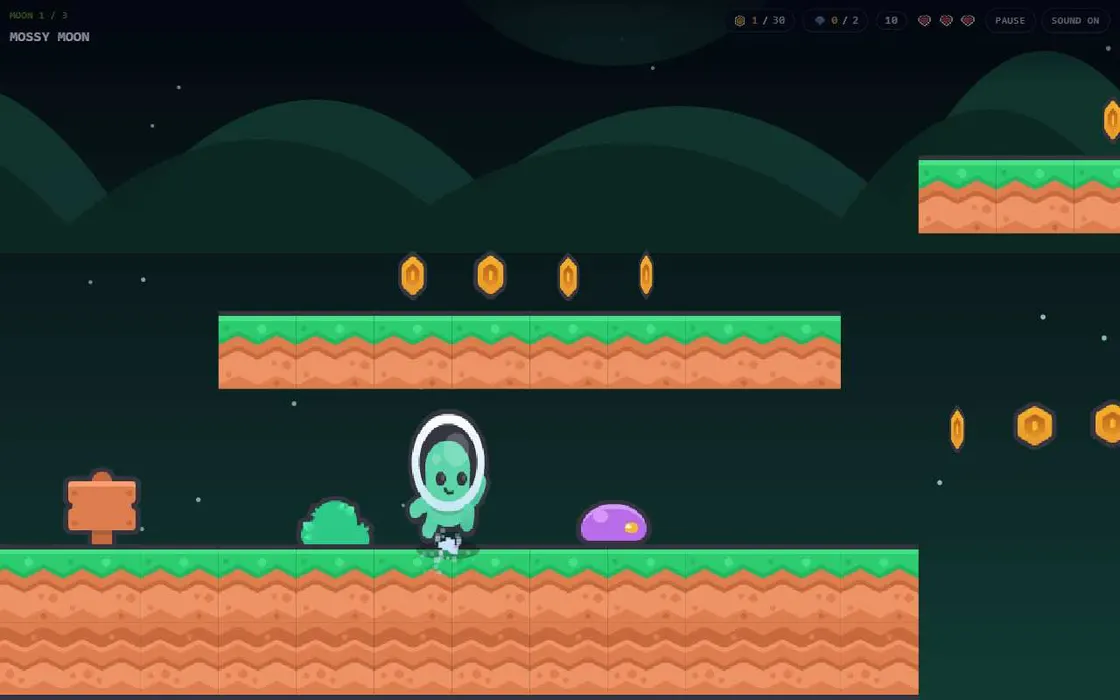
A side-scrolling platformer that fills the screen. A little alien runs and jumps across three short levels, collecting coins and avoiding slimes. Each level adds something: moving platforms, then spikes, then a flying enemy. Three hearts, a coin count, a flag at the end of each level. Use ready-made platformer sprites and sound effects. Keyboard and touch.
Watch for
- "Make it fun" is not a design. Say what the player has to deal with: at least three different things, introduced over time.
- A game is the most code of anything here. On a small budget you get a start screen and one mechanic.
- If it feels wrong (too fast, floaty, unfair), say how it feels in a change. That is quicker than a new build.
3D scene or game
Scenes you can look around, product viewers and simple 3D games.
Put in the request
- What is in the scene and what you can do in it (orbit, walk, drive, click things)
- Stylised or realistic: low-poly kits and realistic models do not mix well
- Time of day and mood
- The setting by name (forest, city, space, dungeon): it decides which model kit fits
It adds on its own
- Low-poly models from one kit made to fit together, or realistic props
- A real sky that lights the scene, when the scene calls for one
- Surface textures for floors and walls
- Physics when you ask for things that fall, roll, stack or bounce
- Drag to look around, and a short hint on screen
A request to copy
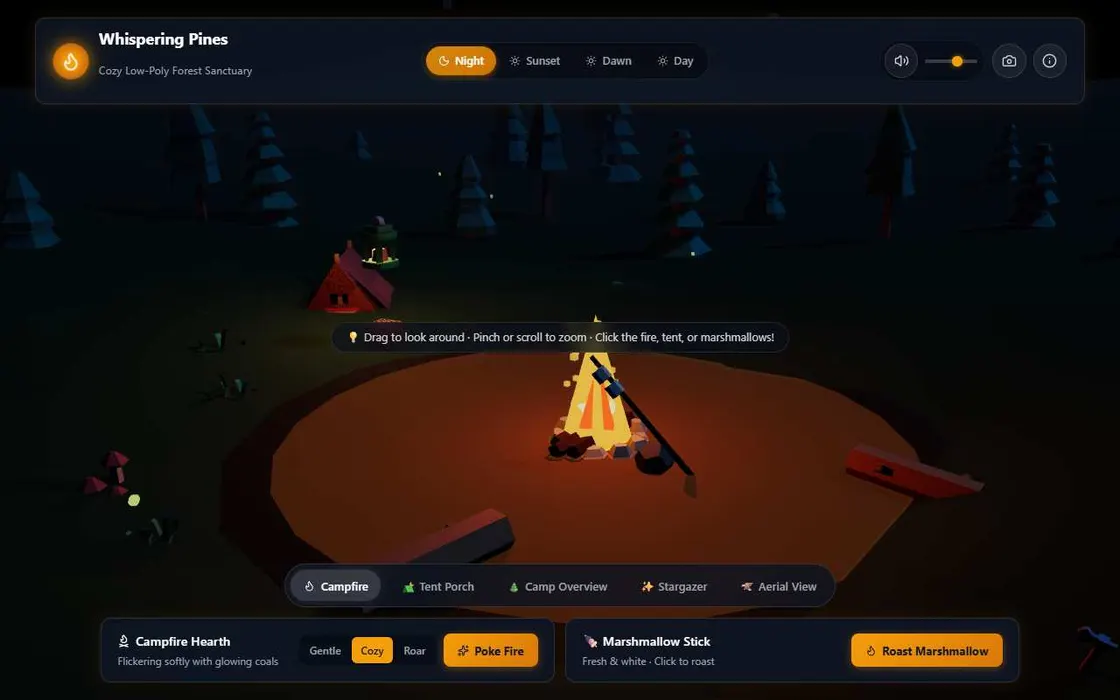
A cosy low-poly forest campsite I can orbit around. A tent, a campfire with flickering light, logs to sit on, pine trees and rocks around a clearing. A button switches between day and night; at night the fire is the main light and there are stars. Use ready-made 3D models from one kit.
Watch for
- 3D is the heaviest kind of build to load. Keep scenes to what the idea needs; a phone has to run it.
- Realistic models and skies are larger files. Ask for stylised low-poly unless realism is the point.
Dashboard and charts
Numbers, charts, tables and filters on one screen.
Put in the request
- The three or four questions the screen should answer
- Your data, pasted in, or what the sample data should look like
- Which filters matter (date range, team, category)
- Who reads it and on what screen
It adds on its own
- The headline numbers at the top, charts and a sortable table below
- Filters that update everything together
- Believable sample data with trends when you give none
A request to copy
A dashboard for a small online shop's last 90 days. Top row: revenue, orders, average order value, returning customers, each with the change on the previous period. A line chart of daily revenue, a bar chart of the top eight products, and a table of recent orders I can sort. Filter by 7, 30 or 90 days.
Watch for
- Without your data it shows sample data. That is fine for a mock-up and wrong for a report.
- To show live numbers from your own service, see "App with live data" below.
Tool or calculator
Calculators, converters, quizzes, planners, generators: you enter things and get a result.
Put in the request
- What goes in, field by field
- What comes out, and the rule or formula if you know it
- What should happen with odd input (empty, zero, huge)
- Whether entries should still be there next time
It adds on its own
- Labelled inputs with sensible limits and clear error messages
- Results that update as you type
- A layout that works one-handed on a phone
A request to copy
A tip splitter. I enter the bill, pick a tip of 10, 12.5, 15 or 20% or type my own, and the number of people. It shows the tip, the total, and what each person pays, rounded up to the nearest 10p, with a line saying how much extra the rounding adds. Big buttons, one screen, no scrolling on a phone.
Watch for
- If the maths matters (tax, medicine, money), give the formula. Check the result against a case you know.
Storybook
An illustrated, narrated story you page through.
Put in the request
- The story in a few lines, or the whole text if you have written it
- How many pages (six to ten works well)
- The art style, in a phrase
- Whether it should be read aloud, and in what kind of voice
It adds on its own
- A picture per page in one consistent style
- Recorded narration per page, with a play button
- Page turning by click, swipe and arrow keys
A request to copy
An eight-page bedtime story about a small lighthouse that is afraid of the dark and learns that its own light is what makes the night safe for ships. Soft watercolour pictures, a calm narrator, big page-turn buttons. End on a quiet page that says goodnight.
Watch for
- Pictures and narration are the cost here: 5 credits per picture, about 1 per 200 characters of speech. Eight illustrated, narrated pages need a Large budget.
- A build can hold up to 12 generated pictures and 12 recordings.
App that remembers
Leaderboards, guestbooks, polls, saved progress.
Put in the request
- What is remembered
- Whether everyone sees it (a leaderboard, a guestbook, votes) or only the person who made it (their progress, their settings)
- Any limits: top ten only, one vote each, names up to 20 letters
It adds on its own
- Saved data that survives a reload and a new visit
- Shared data for all visitors, and private data per visitor
- Sensible limits so one visitor cannot flood it
A request to copy
A daily word-guessing game with a leaderboard. After finishing, I type a name (up to 12 letters) and my number of guesses goes on today's top twenty, which everyone can see. My own streak of days played is remembered just for me.
Watch for
- Anything visitors type into shared data is public to other visitors. Ask for length limits, and do not collect personal details.
- Deleting the build deletes its saved data.
App with live data
Weather, prices, your own service: data from outside, fetched safely.
Put in the request
- Which service, and what the app shows from it
- That it should work with sample data first
It adds on its own
- The app built against a named connection, with sample data until the connection exists
- A note in its summary telling you exactly which connection to add
A request to copy
A weather page for surfers. It shows wave height, wind and tide for the next three days at a beach I choose from a list of five. Use a connection named "surf" for the forecast service, and sample data until I add it.
Watch for
- A build cannot call outside services by itself. You add a connection on the build's page: the service address and your key. The key is stored encrypted, sent only to that service, and never reaches visitors.
- Every visitor's request counts against your key. Set the daily limit on the connection to something you are happy to pay for.
App that thinks
A quiz that marks written answers, a character you can talk to, a tool that writes or draws.
Put in the request
- What the app asks ALMA for, and when (on a button press, not on every keystroke)
- What it does while waiting, and when the answer cannot be had
It adds on its own
- Calls to ALMA from inside the app, with a waiting state
- A fallback when the daily allowance is used up
A request to copy
A French practice app. It shows an English sentence, I type the French, and it tells me whether I am right, what I got wrong, and a more natural way to say it. Ten sentences a round, score at the end.
Watch for
- This spends credits while people use it. On the build's page you choose who pays: you, up to a daily allowance, or each signed-in visitor from their own credits.
- It is off until you set an allowance. Start low.
Getting the look right
Left alone, it picks a look that suits the subject. A few words from you make it yours.
Give colours, not adjectives
"Navy, off-white and one coral accent" gets you that. "Modern and professional" gets you whatever is most common.
Name a mood from somewhere real
A 1970s airline poster. A field guide. An arcade cabinet. A museum label. A reference with a point of view pulls the whole page together.
Pick one kind of picture
Generated pictures for a hero or an illustration, photographs for real places and things, icons for small labels. Ask for one icon set and it will keep to it.
Ask for space
If a page feels cramped, say so: "more room around headings, fewer things per row". If it feels empty, say what should fill it.
Say what it should not look like
"No purple gradient, no three identical cards per row." Ruling out the default look is allowed, and it works.
Motion in one place
Ask for movement where it matters: the hero, a win, a page turn. Everything moving at once reads as noise.
Free asset library
While it builds, it can search a library of ready-made files and save the ones it picks into your build. They are free to use, cost no credits, and usually look better than shapes drawn in code. It reaches for them by itself; naming what you want makes sure.
| What | Good for | Ask like this | From |
|---|---|---|---|
| Icons | Feature lists, buttons, menus, labels | "use icons for the features" | Open icon sets, through Iconify |
| Game sprites | Characters with animation frames, enemies, tiles, pickups, effects, game buttons, key and touch prompts | "use ready-made platformer sprites" | Kenney |
| Sound effects | Clicks, jumps, lasers, impacts, coins, win and lose jingles, a voice saying "game over" | "add real sound effects" | Kenney |
| 3D models | Low-poly kits (nature, city, cars, space, dungeon, castle, food, furniture, animals) and realistic props | "use 3D models from a nature kit" | Kenney, Poly Haven |
| Textures | Brick, wood, metal, stone, fabric and ground for 3D surfaces or page backgrounds | "a worn wooden floor texture" | Poly Haven, ambientCG |
| Skies | A real 360 degree sky that lights and surrounds a 3D scene | "light the scene with a sunset sky" | Poly Haven |
| Photographs | Real places, nature, objects and textures for heroes and backgrounds | "a public-domain photo of a mountain lake for the hero" | Openverse, public domain only |
Things in a pack match each other
Game art and 3D models come in packs drawn in one style: a platformer pack, a space pack, a nature kit, a city kit. 3D kits are used whenever they fit. Game sprite packs are used only when you ask for ready-made sprites or pick them when the build starts, because art made for your own game usually looks better; when they are used, the player, enemies and scenery come from the same pack.
A build that uses the library gets a small Credits link listing who made what. Everything in the library is free to use on any site, including sites that make money. Some of it asks only that its makers and licence are named, and that link is how your build does so. Leave it in.
Budget and models
You set the most a build may spend. It is charged for the work it actually does and anything it makes, and the rest comes back when it finishes.
| What uses credits | Cost | Per build |
|---|---|---|
| The building itself | By the work done, at the price of the model you picked | Up to your budget |
| A generated picture | 5 credits | Up to 12 |
| Recorded speech | About 1 credit per 200 characters | Up to 12 recordings |
| A piece of music | 100 credits | Up to 2 |
| Anything from the free library | Free | Icons, sprites, sounds, models, textures, skies, photos |
| Asking for ideas first | Free | A few times every ten minutes |
When the budget runs low
Near the end of its budget it stops adding features and makes sure what exists works. You still get the build, and you can add what is missing with a change.
When a build fails
If it fails or you cancel it, every credit held for it comes back. You are never charged for a build you did not get.
Choosing a model
The default is a good place to start. Models differ in character: some are tidy and brief, some reach further. For wording and small changes a cheaper one is fine. Games and 3D, where a lot of code must work together, are where a stronger one earns its price.
Thin result, specific request?
Run the same request on a different model before rewriting it. It is the cheapest experiment there is, and the difference is often larger than you expect.
Changing a build
The first build is a draft. Change something, on the build's page or under its card in Discord, is where it becomes what you wanted. Each change shows in the build's history with what you asked and what it cost.
One change, one message
A change is made on a copy and checked before it replaces the live build. Small changes pass that check; sprawling ones are where things break.
Show what looks wrong
For anything visual (overlapping text, a button in the wrong place, a broken layout on your phone) attach a screenshot to the change, up to three. On the website you can paste one straight into the box. It sees exactly what you see, which no description matches.
Point at the place
Name the page and the part. On the website you can see the build beside the box while you write.
Say what to keep
"Keep the colours and the header, redo the pricing section" protects what you like. It changes only what the request needs, but telling it helps.
Pick the budget for the change
A wording or colour change needs little. A new page or a new game mechanic needs as much as a small build.
Pick the model for the change
You can choose a different model for each change, in Discord and on the website. A cheaper one is fine for wording; use a stronger one for new behaviour.
A failed change costs nothing
If a change fails or you cancel it, the build stays as it was and the credits come back.
make it better and fix the bugs
On the home page, the three feature cards overlap on my phone. Stack them in one column below 600px wide. Keep everything else as it is.
What a build cannot do
Builds are hosted by ALMA and run in a sealed box, which is what keeps your visitors and your keys safe. Knowing the walls saves you from asking for something that will not work.
It cannot call other websites by itself
No fetching from other sites, no forms that post elsewhere. Outside data comes through a connection you add.
It has no server of its own
There is no database you can query and no code that runs when nobody is looking. Saved data (shared or per visitor) covers scores, votes, guestbooks and progress.
No accounts, payments or email
It cannot log people in with passwords, take card payments or send mail. A page that imitates a real service's login is not allowed and will not be published.
Media lives inside the build
Pictures, sound and models are files in the build, not links to other sites, so a build keeps working when the rest of the web changes.
There is a size limit
Up to 300 files and 80 MB per build. That is far more than a site needs; it mostly matters for 3D.
No video, no uploads
The builder does not make video, and there is no way to upload your own files into a build yet. Pictures, speech and music are made for it, or taken from the free library.
Sharing it
Private until you say so
A new build can be opened only by you. Publishing makes it visible to anyone with the link, after an automatic check of what it contains.
A private link, for a preview
The link you are given for a private build carries a pass, so you can show it to someone before publishing. The pass stops working after seven days.
Download and remix are your choice
When a build is public you can let signed-in visitors download its files or remix it into their own copy. Both are off by default. A remix never includes your keys or saved data.
You can download it yourself
The download is a zip with a starter for Windows, Mac and Linux, so it runs on your own computer without knowing how to set up a server.
See who visits
Each build shows its visits: how many, how many different people, which countries and devices. Your own visits are counted apart.
Credit where it is due
When a build uses the free asset library it gets a Credits link listing who made those assets and under which licence. Some of those licences require it, so leave it in.
When it goes wrong
It built something much simpler than I asked for
Usually the budget or the request. Say what a person does in it step by step, list the must-haves, and give a game, 3D scene or storybook a Large budget. If the request was already specific, the same request on another model is a cheap experiment.
The build failed
A build that fails or is cancelled is refunded in full. Try again as it was; if it fails twice, shorten the request to the core idea and add the rest with changes.
It stopped before it was finished
When the budget is nearly used it stops adding features and makes sure what exists works. You still get the build. Add what is missing with a change, with its own budget.
It looks generic
Give it colours, a mood from somewhere real, and your own words. Ask for icons and a hero picture. Say what it should not look like.
It cannot seem to fix how something looks
Attach a screenshot of the problem to the change and say what you expected to see instead. Use a model that reads pictures; the form tells you when the one you picked cannot.
A change broke something else
Say exactly what is now wrong and on which page. Each change is checked before it goes live, but only for errors, not for what you meant.
The game is too hard, too easy or feels off
Describe how it feels and what you expected: "enemies appear too fast after level two", "the ship turns too slowly". Feel is tuned in changes, not in the first build.
No sound on my phone
Sound starts after your first tap, and silent mode mutes it. Some older iPhones cannot play the library's sound files; the game is built to carry on without them.
The numbers or facts are wrong
It used invented or searched content because the request had none. Send the right ones in a change and they will be used as written.
Questions
What does a build cost?
What it uses, up to the budget you set. Each step of work is charged at the model's price; a generated picture is 5 credits, speech about 1 per 200 characters, a piece of music 100. The free asset library costs nothing. Whatever is left of the budget comes back.
Which model should I pick?
The default is a good start. Models differ in character: some are tidy and brief, some more ambitious. For wording and small changes a cheaper model is fine. For games and 3D, where a lot of code has to work together, a stronger one earns its price.
Can I use what it makes?
Yes, the build is yours to publish, download and change, within the Acceptable Use Policy. Assets from the free library keep their own open licences, listed in the build's credits.
Can it copy an existing website?
It can take a layout or palette from a reference image. It will not publish a page that imitates a real service to collect logins or details.
Can I edit the files myself?
Download the build and edit it on your own computer. The copy hosted by ALMA is changed by asking for changes.
How many builds can I have?
Up to 100 at a time. Delete the ones you no longer need; deleting a build removes its files, saved data and visits.
Where do the free assets come from?
Icons from open icon sets through Iconify, game art, sounds and low-poly models from Kenney, skies, textures and models from Poly Haven and ambientCG, and public-domain photographs through Openverse. All are free to use, and each build lists what it used.
Have an idea?
Write two sentences about what a person does in it, pick a budget, and see what comes back.
Something here wrong, or missing? Tell us. This guide is written from what people actually build.